

Introduction
In the modern digital era, ensuring web accessibility is not simply a best practice—it is a necessity. The internet connects billions of users worldwide, and a significant portion of them rely on assistive technologies such as screen readers, voice navigation tools, and keyboard-only navigation systems. When websites fail to consider accessibility standards, these users may face serious barriers that prevent them from accessing digital services, information, and online opportunities.
According to Straits Research, the global web accessibility software market is projected to reach US$ 825.43 million by 2032, growing at a 4.32% CAGR between 2024 and 2032. This growth highlights the increasing importance of accessibility compliance and inclusive web development practices.
One of the most effective ways to ensure compliance and usability is accessibility testing in Chrome. Because Google Chrome dominates the browser market, testing accessibility in Chrome helps developers identify and resolve barriers affecting a large portion of users.
What is Accessibility Testing?
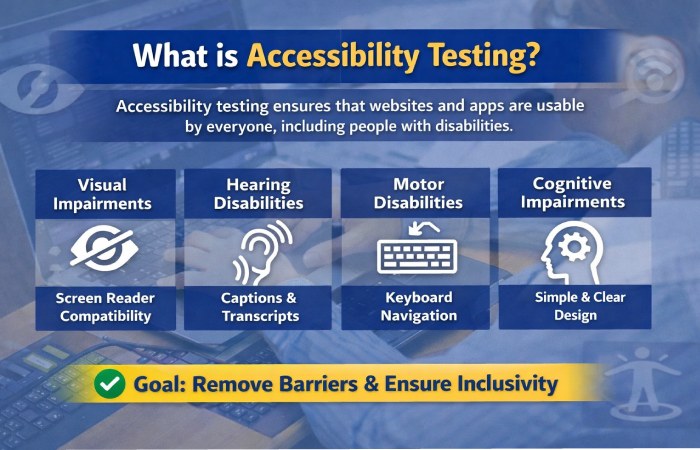
Accessibility testing is a specialized form of usability testing that ensures websites, applications, and digital platforms are accessible to people with disabilities. The goal is to verify that all users—regardless of physical or cognitive limitations—can access and interact with online content.
This includes users with:
- Visual impairments
- Hearing impairments
- Motor disabilities
- Cognitive limitations
Accessibility testing evaluates whether assistive technologies can effectively interact with digital interfaces.
Key Objectives of Accessibility Testing
| Objective | Description |
| Inclusive Experience | Ensure people with disabilities can use websites without barriers |
| Legal Compliance | Meet global accessibility regulations and standards |
| Better Usability | Improve navigation and usability for all users |
| Technology Compatibility | Ensure compatibility with assistive technologies |
| Risk Reduction | Avoid lawsuits and compliance penalties |
Accessibility testing often combines automated testing tools with manual testing techniques to ensure a comprehensive review.
Types of Disabilities Considered in Accessibility Testing
Accessibility testing focuses on multiple categories of disabilities to ensure inclusive user experiences.
| Disability Type | Description | Example Challenges | Testing Solution |
| Visual | Blindness, low vision, color blindness | Cannot see images or text | Screen reader compatibility |
| Hearing | Partial or complete hearing loss | Cannot hear audio content | Provide captions or transcripts |
| Motor | Limited movement or coordination | Cannot use mouse | Keyboard navigation support |
| Cognitive | Learning disabilities or memory issues | Difficulty understanding complex layouts | Simple navigation and clear instructions |
Developers must design interfaces that accommodate these different needs.
Key Elements Tested in Accessibility Testing
Accessibility testing evaluates several crucial elements of web interfaces.
| Element | Purpose | Example Implementation |
| Alt Text | Describes images for screen readers | <img alt=”Accessible website design”> |
| Keyboard Navigation | Allows full navigation without mouse | Tab navigation across buttons |
| Color Contrast | Improves readability for low-vision users | High contrast between text and background |
| ARIA Labels | Provide context to assistive technologies | aria-label=”Search” |
| Form Accessibility | Makes forms usable for screen readers | Proper labels and instructions |
| Multimedia Accessibility | Supports captions and transcripts | Subtitles in video content |
Why Accessibility Testing in Chrome is Important
Because Google Chrome holds a dominant share of the global browser market, it is one of the most critical platforms for accessibility testing.
Chrome also includes powerful developer tools and extension support that make accessibility testing easier and faster.
Benefits of Testing Accessibility in Chrome
| Benefit | Explanation |
| Largest User Base | Chrome is the most widely used browser globally |
| Advanced Developer Tools | Built-in accessibility inspection tools |
| Extension Ecosystem | Accessibility testing plugins available |
| Automation Support | Works with automation frameworks |
| Assistive Technology Compatibility | Compatible with screen readers and keyboard navigation |
Accessibility Standards and Compliance
Organizations must comply with multiple global accessibility standards.
| Standard | Description | Region |
| WCAG | Global accessibility guidelines for web content | International |
| ADA | Legal framework for accessibility rights | United States |
| Section 508 | Accessibility requirement for government websites | United States |
| EN 301 549 | Accessibility standard for ICT products | Europe |
| European Accessibility Act | Mandates accessibility across EU digital services | European Union |
These standards ensure that digital products remain usable for individuals with disabilities.
Accessibility Testing Tools for Chrome
There are multiple tools available to perform accessibility testing within Chrome.
| Tool | Description | Best For |
| Axe DevTools | Automated accessibility testing extension | Developers and QA teams |
| Lighthouse | Built-in Chrome auditing tool | Performance and accessibility checks |
| WAVE | Accessibility evaluation tool | Visual accessibility analysis |
| LambdaTest Accessibility DevTools | Cloud-powered accessibility testing extension | Cross-browser accessibility testing |
| Accessibility Insights | Microsoft accessibility testing tool | Advanced audits |
Among these tools, LambdaTest Accessibility DevTools Chrome Extension stands out for its integration with cloud testing platforms.
LambdaTest Accessibility DevTools Chrome Extension
The LambdaTest Accessibility DevTools Chrome Extension is designed to simplify accessibility testing directly inside the browser.
Powered by axe-core accessibility engine, this extension helps developers detect and resolve accessibility issues in real time.
Core Features
| Feature | Description |
| Real-Time Testing | Analyze accessibility issues instantly |
| Automated Audits | Detect WCAG violations automatically |
| Detailed Reports | Provides recommendations for fixes |
| Interactive UI | Highlights problematic elements |
| Cloud Integration | Connects with LambdaTest testing platform |
| Manual Testing Support | Allows custom accessibility checks |
How LambdaTest Simplifies Accessibility Testing
Accessibility testing can often be complicated and time-consuming. LambdaTest simplifies the process with automated and manual tools.
Workflow Overview
| Step | Process |
| Install Extension | Download from Chrome Web Store |
| Open Website | Navigate to the site you want to test |
| Run Scan | Launch accessibility audit |
| Analyze Report | Review violations and suggestions |
| Fix Issues | Implement accessibility improvements |
This streamlined workflow allows developers to fix accessibility issues early in the development cycle.
Accessibility Testing Automation with Selenium
Automation plays a major role in modern accessibility testing workflows.
Developers using Selenium WebDriver can integrate accessibility checks directly into their CI/CD pipelines.
Benefits of Automated Accessibility Testing
| Benefit | Explanation |
| Continuous Monitoring | Detect issues during development |
| Faster Testing | Automate repetitive checks |
| CI/CD Integration | Works with DevOps pipelines |
| Scalability | Test across multiple browsers |
Automation ensures accessibility remains consistent across updates.
Best Practices for Accessibility Testing
Developers should follow best practices to ensure accessibility compliance.
| Best Practice | Description |
| Use Semantic HTML | Proper HTML tags improve accessibility |
| Provide Alt Text | Describe all meaningful images |
| Maintain Color Contrast | Ensure readability for low-vision users |
| Enable Keyboard Navigation | Allow users to navigate without a mouse |
| Test with Screen Readers | Validate accessibility manually |
| Use Automated Tools | Detect accessibility issues quickly |
Assistive Technologies Used in Accessibility Testing
Accessibility testing involves verifying compatibility with assistive technologies.
| Technology | Purpose |
| Screen Readers | Convert text to speech |
| Screen Magnifiers | Enlarge text for visually impaired users |
| Voice Recognition Software | Allows voice-based navigation |
| Alternative Keyboards | Assist users with motor impairments |
Testing with these tools helps simulate real user experiences.
Advantages of Using LambdaTest Platform
LambdaTest offers a powerful ecosystem for accessibility and cross-browser testing.
| Feature | Advantage |
| 3000+ Browsers & Devices | Test across real environments |
| Cloud Infrastructure | No local setup required |
| Automation Integration | Works with Selenium and Cypress |
| Real Device Testing | Ensures real-world compatibility |
| Faster Debugging | Identify issues quickly |
This makes it easier for development teams to maintain accessible applications.
Future of Accessibility Testing
Accessibility testing will continue evolving alongside web technologies. Artificial intelligence, automated testing frameworks, and cloud testing platforms will play a major role in improving accessibility compliance.
The future of accessibility testing will likely include:
| Trend | Impact |
| AI Accessibility Tools | Automated detection of design issues |
| Voice-First Interfaces | Accessibility for voice-based browsing |
| Inclusive Design Systems | Built-in accessibility components |
| Real-Time Accessibility Monitoring | Continuous accessibility auditing |
As digital ecosystems grow, accessibility will become a fundamental requirement rather than an optional feature.
Conclusion
Web accessibility is an essential aspect of modern digital development. Millions of people rely on assistive technologies to access online information and services. Without proper accessibility practices, these users may face barriers that limit their ability to interact with digital platforms.
Accessibility testing in Google Chrome plays a crucial role in identifying and fixing these barriers. Chrome’s powerful developer tools and accessibility extensions allow developers to test and optimize websites efficiently.